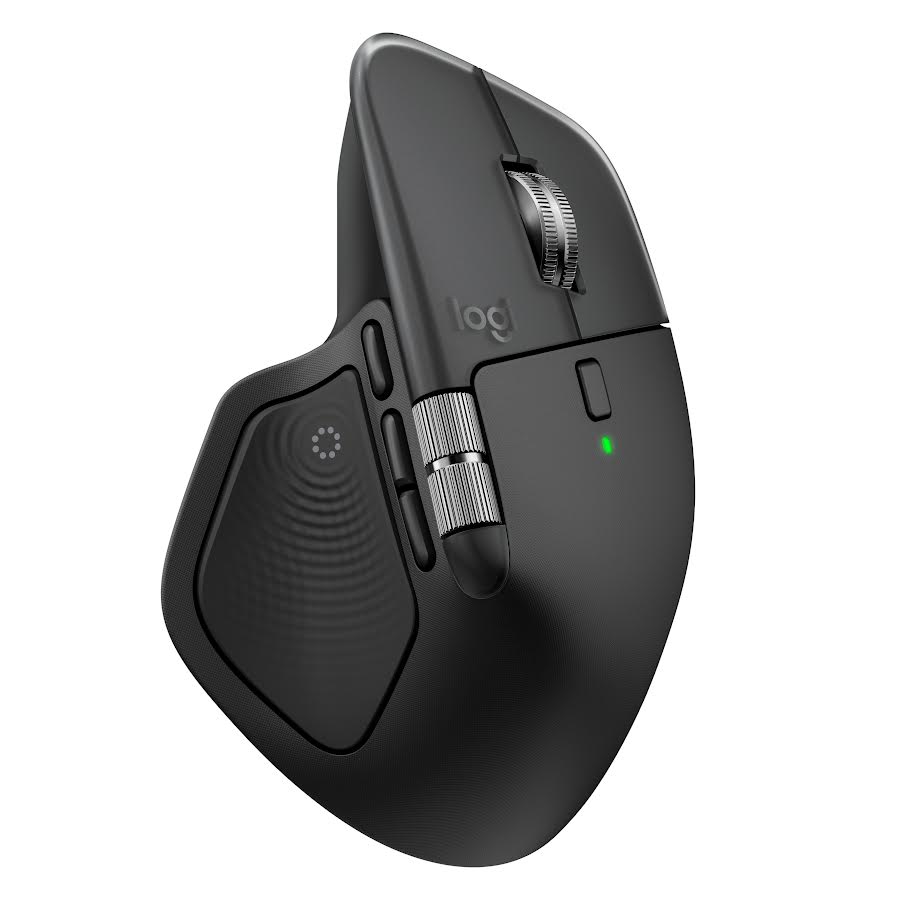
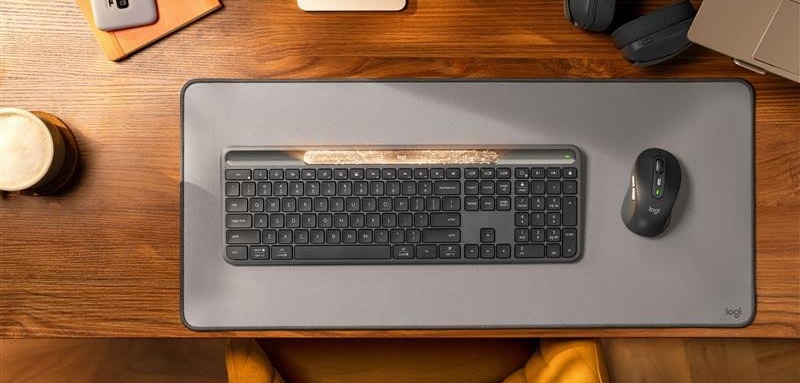
Logitech Signature Slim Solar+ K980 keyboard & MX Master 4 mouse

The Logitech mouse and keyboard combos of the last half-decade and more have, for my money, become something of a de facto standard for writing with.
There are one or two contenders (Bakker Elkhuizen makes great keyboards and laptop stands), but I’ve given my Logitech products such heavy use that I’m in danger of actually “wearing out” the plastic handgrip area on my MX Master 3 mouse.
We’ll get to the new mouse in a moment, but first, to the keyboard.
I’m deeply attached to my MX Keys device, its fluid keystroke movements are sublime and it almost “encourages” me to touch-type and not look down, such is the ergonomic fit and engineering.
But Logitech wanted things to move on, so the Signature Slim Solar+ K980 and Signature Slim Solar+ K980 for Business wireless keyboards have arrived.
Okay yes, my MX Keys does run out of charge more frequently than it used to a few years back (I think a charge lasts about 10 days), but the option to charge up a keyboard that looks and feels almost the same (but not quite) and is powered by any light – sunlight or artificial light – with no charging interruptions and no setup stress seemed pretty appealing.
It was a really sensitive moment. I turned on the Signature Slim Solar+ K980 for Business and established a Bluetooth connection in seconds. The new keyboard is a little more grey than the black of old, but that’s inconsequential i.e. what matters is keystroke travel, feel, functionality and usability.
For a moment, I didn’t like it, it’s quieter than the satisfying clickety-clack of the MX Keys… but then I did like it, it’s slicker and smoother somehow. It doesn’t have the fabulous light-up functionality that the MX Keys does, but the fact that it works, kind of, forever, from light… makes it very appealing.
Powered by Logi LightCharge technology, this new keyboard uses light from any light source to stay charged and ready to use. The company says it works in complete darkness for up to four months once fully charged.
As you would expect, the new keyboard works across PC, tablet and mobile with multi-OS compatibility and the same triple set of “Easy-Switch keys” to toggle between up to three devices
“Even the need to think about charging can be a distraction, so we designed Signature Slim Solar+ to take that off your plate completely,” said Art O’Gnimh, general manager of core products group at Logitech. “It stays powered by light – any light – clearing your desk of cables and eliminating the need to ever physically charge it, while bringing elegance and comfort to your workspace. That’s one less thing to worry about on a busy working day.”
Sourcing sustainability
The plastic parts in the graphite version of Signature Slim Solar+ feature 70% certified post-consumer recycled plastic and include a rechargeable battery built to last up to 10 years, eliminating the need for replacement. These choices align with Logitech’s Design for Sustainability principles, aiming to reduce our carbon footprint while ensuring durability, reliability, and long-term performance.
The keyboard can be monitored through Logitech Sync, providing IT teams with a central view of individual devices, including product and firmware status.
As is my preferred way, I like to customise some shortcut keys on the Logitech keyboards and this one offers up to 23 shortcut keys, including the AI Launch Key, which is nice and was defaulted to Microsoft Copilot for AI, but you can change it to Gemini or ChatGPT and so on.
The keyboard is once again customisable through Logi Options+ and when I added in a new keyboard and a new mouse, the app showed all four devices and my Logitech webcam too (hey, UK Border Force uses them, so it’s good enough for British Homeland Security, then it’s good enough for me), so full control is easy. There’s also an option to assess whether your light source is enough to keep the keyboard fully pumped, or to alert you that you can experience some battery drainage.
Logitech MX Master 4
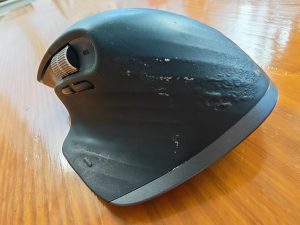
I use this device to within an inch of its life.
Now then, take a look at my old mouse (pictured here)… I think it would keep going for another five years, but it’s showing signs of how much I depend on this thing.
I’m now enjoying its replacement, the MX Master 4, the newest member of the MX Master series, designed to for creative professionals, developers and business users.
With immersive haptic feedback, advanced software and stronger connectivity, the company says that MX Master 4 sets a new standard in control, precision and productivity for the most demanding workflows.
Tolya Polyanker, general manager of the MX business at Logitech has said that, in today’s fast-paced and demanding world, advanced users need tools that help them redefine their workflows to deliver more in less time.
“We designed MX Master 4 to bring next-level immersion and speed to our users thanks to the tactile haptic feedback and instant access to their favorite tools with the Actions Ring software overlay,” said Polyanker. “The MX Master 4 reimagines user control with customisable haptic feedback, delivering subtle vibrations for scrolling, navigation and selection. This tactile precision is ideal for tasks like video editing, design work and data analysis.”
Actions Ring
Actions Ring is a digital overlay enabled by Logi Options+ now. It offers app-specific shortcuts and customisable controls to place frequently used tools at the users fingertips anywhere on screen. With features such as assigning commands in Photoshop or automating functions in Excel, Logitech claims that professionals can save up to 33% of their time and reduce repetitive mouse movements by 63%.
“MX Master 4 is designed with thoughtful choices to reduce environmental impact, carefully selecting materials like a minimum of 48% certified post-consumer recycled plastic, a low-carbon aluminium thumbwheel and a battery featuring 100% recycled cobalt to minimise resource use and carbon emissions. There is paper packaging that is responsibly sourced from FSC™-certified materials, unpainted plastic parts and a design that is easy to disassemble to simplify recycling,” notes the company.
The MagSpeed scroll wheel scrolls up to 1,000 lines per second. Like the keyboard, the company has built the mouse to be quieter (not something I like, but there you go) and it is described as still offering a satisfying tactile feel with 90% less noise (compared to the MX Master 3). While that might be perfect for environments like open spaces and shared offices, I work alone… and I want a noisy mouse.
USB-C quick charging means that a 1-minute charge powers up to 3 hours of use, while a full charge lasts up to 70 days.
Overall, has Logitech done better?
Well, yes, of course it has, these are tough products to improve upon and the innovation opportunity for the company must be narrowing at some point. Not to say that both devices are almost perfect, but it’s hard to see how the company will progress these devices in a few years’ time i.e. it may be a case of deeper software functionality as opposed to any physical redesign.