VoIP performance testing fundamentals
VoIP network performance testing can mean the difference between a VoIP system working at a high level QoS and a weak system that runs so poorly customers could take their business elsewhere. This guide discusses why it is important to run regular performance testing and some of the ways it can be done.
VoIP network performance testing can mean the difference between a VoIP system working at a high level QoS and a weak system that runs so poorly customers could take their business elsewhere. This guide discusses why it is important to run regular performance testing and some of the ways it can be done.
Table of contents
- How can virtual network test beds ensure VoIP performance?
-- Using a virtual network test bed before implementing a VoIP can help guarantee both the initial VoIP deployment and the long-term health of a VoIP network. - What can your manageable electronics tell you before you implement VoIP?
-- Before implementing a VoIP network, it is important to look at all the factors to determine if the network will run as planned. - How can one test VoIP functionality with their existing PBX or Key system?
-- This section discusses useful configurations for testing VoIP functionality on an existing PBX or Key system. - When should a VoIP system be analyzed and with what tools?
-- This section discusses some options for analyzing a VoIP network and what tools can be helpful in the process.
Voice over IP (VoIP) technology offers a wide range of benefits -- including reduction of telecom costs, management of one network instead of two, simplified provisioning of services to remote locations, and the ability to deploy a new generation of converged applications. But no business can afford to have its voice services compromised. Revenue, relationships and reputation all depend on people being able to speak to each other on the phone with five 9's reliability.
Thus, every company pursuing the benefits of VoIP must take steps to ensure that their converged network delivers acceptable call quality and non-stop availability.
@37737 A virtual network test bed is particularly useful for taking risk out of both initial VoIP deployment and long-term VoIP ownership. Essentially, such a test bed enables application developers, QA specialists, network managers and other IT staff to observe and analyze the behavior of network applications in a lab environment that accurately emulates conditions on the current and/or planned production network. This emulation should encompass all relevant attributes of the network, including:
- All network links and their impairments, such as: physical distance and associated latency, bandwidth, jitter, packet loss, CIR, QoS, MPLS classification schemes, etc.,
- the number and distribution of end users at each remote location and
- application traffic loads.
This kind of test bed is indispensable for modeling the performance of VoIP in the production environment, validating vendor claims, comparing alternative solutions, experimenting with proposed network enhancements, and actually experiencing the call quality that the planned VoIP implementation will deliver.
Following are seven best practices for applying virtual network test bed technology to both initial VoIP deployment and ongoing VoIP management challenges:
1. Capture conditions on the network to define best-case, average-case and worst-case scenarios
Conditions in a test lab won't reflect conditions in the real-world environment if they are not based on empirical input. That's why successful VoIP adopters record conditions on the production network over an extended period of time and then play back those conditions in the lab to define best-, average-, and worst-case scenarios. By assessing VoIP performance under these various scenarios, project teams can readily discover any problems that threaten call quality.2. Use the virtual network to run VoIP services in the testing lab under those real-world scenarios
Once the network's best-, average-, and worst-case scenarios have been replicated in the test environment, the project team can begin the process of VoIP testing by running voice traffic between every set of endpoints. This can be done by actually connecting phones to the test bed. Call generation tools can also be used to emulate projected call volumes.3. Analyze call quality with technical metrics
Once VoIP traffic is running in an accurately emulated virtual environment, the team can apply metrics such as mean opinion score (MOS) to pinpoint any specific places or times where voice quality is unacceptable. Typically, these trouble spots will be associated with observable network impairments -- such as delay, jitter and packet loss -- which can then be addressed with appropriate remedies.4. Validate call quality by listening to live calls
Technical metrics alone can be misleading, since the perception of call quality by actual end users is the ultimate test of VoIP success. So the virtual environment should be used to enable the team to validate firsthand the audio quality on calls between any two points on the network under all projected network conditions. Again, a call generator can be used so that testers can act as the "nth" caller at any location.5. Repeat as necessary to validate quality remedies
A major advantage of a virtual environment is that various fixes can be tried and tested without disrupting the production network. Testing in the virtual environment should therefore be an iterative process, so that all bugs can be fully addressed and the rollout of VoIP in the production environment can be performed with a very high degree of certainty.6. Bring in end users for pre-deployment acceptance testing
Since voice quality is ultimately a highly subjective attribute, many VoIP implementation teams have found that it is worthwhile to bring in end users for acceptance testing prior to production rollout. This greatly reduces the chance of the dreaded VoIP mutiny syndrome, where end users balk at call quality despite the best efforts of IT and the fact that call quality meets common industry standards.7. Continue applying the above best practices over time as part of an established change management process
To maintain VoIP quality over time, IT organizations must incorporate the above best practices into their change management practices. This is essential for ensuring that changes in the enterprise environment -- the addition of new locations, the introduction of a new application onto the network, a planned relocation of staff -- will not adversely impact end-to-end VoIP service levels.
It's important to note that while a virtual network test bed will pay for itself by virtue of its support for VoIP and convergence alone, this technology has many other uses that deliver substantial ROI. These uses include the development of more network-friendly applications, better planning of server moves and data center consolidations, and improved support for merger and acquisition (M&A) activity. These significant additional benefits make emulation technology an extremely lucrative investment for IT organizations seeking both to ensure the success of a VoIP project in the near term and to optimize their overall operational excellence in the long term.
What can your manageable electronics tell you before you implement VoIP?
In a recent webcast, we discussed performance management and what to look for when you examine your statistics. One of the worst statistics you can consider as a means to determine your network health is utilization. @37738 There are other statistics that are much more valuable. It is important to look at utilization, but this is only a small piece of health.
The problem with utilization is twofold. First, it is nearly impossible to determine when the workstation is actually in use. Even if someone is sitting at his desk, he may be on the phone and not using the network. Also, many users work locally and then save their work to the network when complete. So in utilization you have to know when the network is really in use to determine how much of the bandwidth is being consumed. Look at the following two diagrams, for instance.
Figure 1. Averages over one week
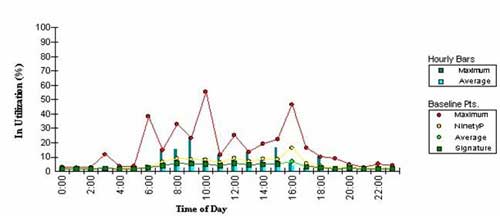
Figure 2. Utilization averages over one month
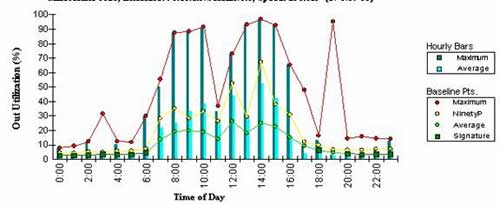
In Figure 1, above, the utilization was measured on the inbound side for a week. Figure 2 shows the same circuit measured over one month. As you can see, the differences in utilization are rather large. When planning for VoIP, you should assume that the peak happens all the time. If not, when processing becomes heavy, you will degrade your voice signal because you have not planned for it.
It is also important to examine buffer space and discards on your active electronics. Switches discard packets as a function. When the buffers get too full, they will drop packets and request a retransmission from the sender. This is not a desirable "feature" for voice. While you can set up VLANs and priority, overloaded gear will not help. In particular, you want to check your discards on any uplink port, and any port that is commonly attached (for instance, where the IP switch may be).
Some errors that you will find in your SNMP data also bear investigation. The most important are bit errors. These may be expressed as InErrors and OutErrors. Not all manageable systems will allow you to drill down further into the error state. Some will allow it, and speed up the troubleshooting process. Anytime you see these errors, the first thing you should do is test your cabling channel that is connected on that port. A brief word about cable testing: Make sure the tester has the latest revision of software and firmware and has been calibrated recently. You also want to be sure that your interfaces and/or patch cords are relatively new. Each has a limited number of mating cycles, and a channel may look bad when in fact it is not.
Next, check your duplex configurations. Duplex mismatches and/or channels that have auto-negotiated to half duplex will further limit your operations. It is important to have full duplex links. A hard setting in either the switch or at the workstation, or faulty cabling, including channels that exceed the maximum distance, can cause half duplex links.
After you fix your errors, you will want to take another network pulse for 30 days. The reason that I recommend a 30-day window is to allow for such things as month-end processing and other functions that do not happen on a daily basis. A Certified Infrastructure Auditor can assist with all of these steps. For more information on specific errors, see the article Common network errors and causes.
Other SearchVoIP.com members who have already faced real-life testing issues came to our site experts for advice. Read on to find out what suggestions were made to remedy their VoIP performance testing issues.
How can one test VoIP functionality with their existing PBX or Key system?
There are multiple possibilities for testing VoIP functionality with an existing PBX or Key system. How you test depends upon your goal.
If you have two sites linked together with PBX tie lines and you want to try using VoIP so that calls will be routed over your internal network rather than costly tie lines, you can test using a SIP to PSTN gateway (such as the MX25.)
This configuration could look like this:
Existing PBX ← T1 PRI → MX25 ← SIP over WAN network → MX25 ← T1 PRI → Existing PBX
Perhaps you have a single site and you want to keep your existing PBX and connect long distance calls through an Internet telephony service provider that provides superior rates. In this case, you could use a SIP to PSTN gateway and connect in this fashion:
Existing PBX ← T1 PRI → MX25 ← SIP over Internet → ITSP →
Perhaps you are planning on replacing your legacy PBX and putting in an IP PBX (such as the MX250) to test the functionality before cutting over service. In this case, the configuration could look like this:
Existing PBX ← T1 PRI → MX250 ← T1 PRI → PSTN
Using this approach, the existing PBX continues to function as it always has and only dial plan entries are required to route calls between systems. This allows for certain employees to learn the new VoIP system and understand its features before migrating over service.
When should a VoIP system be analyzed and with what tools?
We have recently implemented a VoIP network with separate VLANs and QoS. It all seemed to be working fine when it first went in, but recently, certain people have been complaining about sound breakup whilst talking to customers on the phone. I have also had similar problems, but thought it was due to the amount of diagnostics software that I was running on my PC.
To check, I moved my phone into its own port and the breakup is still there. Any ideas how we can check to make sure that the network is doing alright? Also are there any software utilities that would help us with day to day analyzing?
First and foremost -- I would suggest that you have someone come and test your cabling channels. That will be the least expensive and could be the most worrisome component. Even if the channels tested fine when first installed, they can degrade over time with moves, adds and changes.The other thing you didn't mention was if this occurs only on the intra-office calls or only on outside calls. If it is only on outside calls, you may want to get your carrier to check your circuits.
If these things test out okay, then you will want a RMON tool that can track performance. Check your switch SNMP data for errors. These will also give you a good idea of what the culprit may be. If this is happening to everyone in the building -- start looking for common denominators such as network interface cards in the switch.